PDF Drawing Annotation in PipeCloud
The Challenge: Design delivers isometric drawings, but the workshop needs more than design shows: weld numbers, a note about branch orientation, a QC stamp, bending data for the machine operator. In many shops this information is added by hand with a pen, by printing and scanning, or in a separate PDF tool, which leaves several versions of the same drawing and no certainty about which one the welder is holding. In PipeCloud, the drawing is annotated where the spool lives, and the annotated version is the one the shop floor opens.
How it works
- Drawings arrive with the spool. When spools are imported, their PDF drawings are attached to them automatically. The original PDF is always kept.
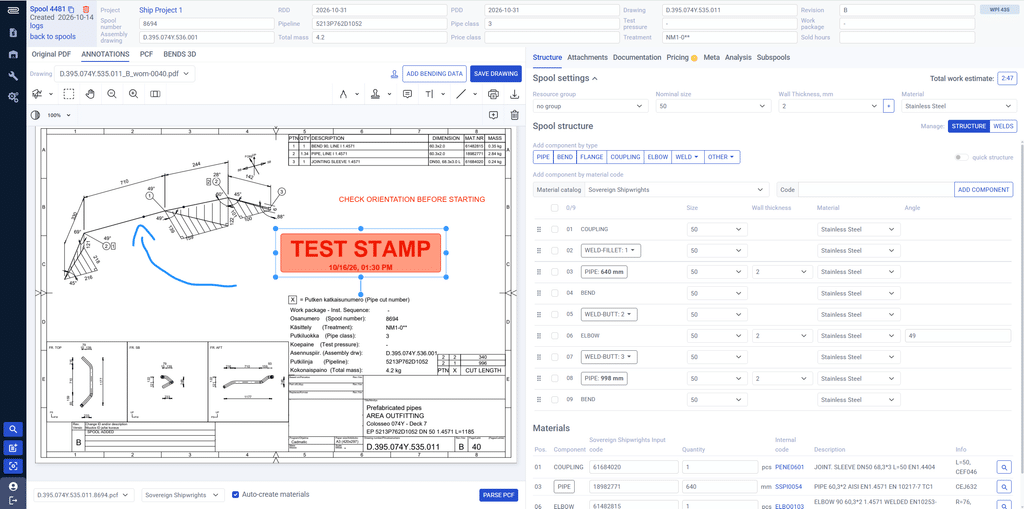
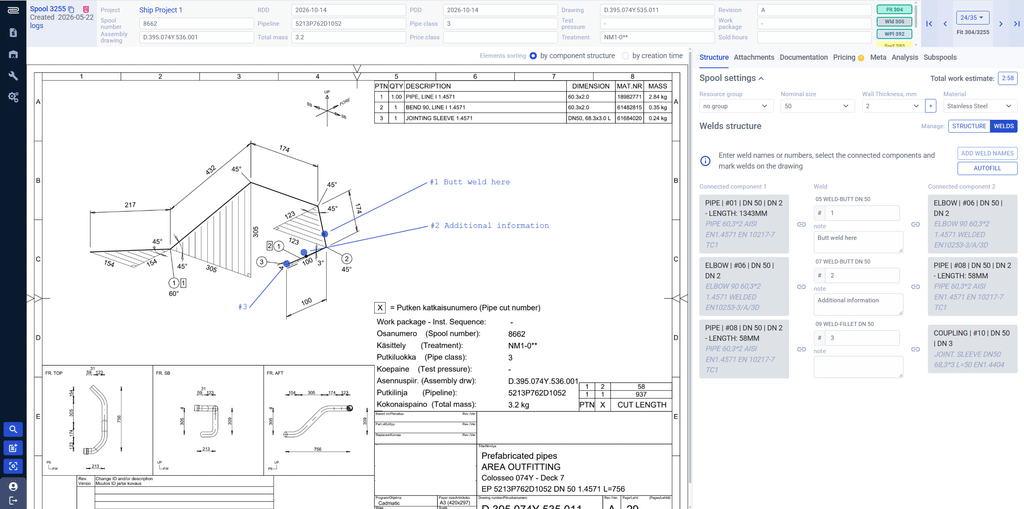
- Annotate in the spool editor. The Annotations tab opens the drawing next to the spool data. Add text, freehand markings, lines and shapes, comments, images, stamps and signatures.
- Add production data to the drawing. Insert the spool’s bending data as a table on the drawing, and place weld points so the weld numbers appear where the welds are.
- Save once. The saved drawing becomes the version shown everywhere the spool appears.
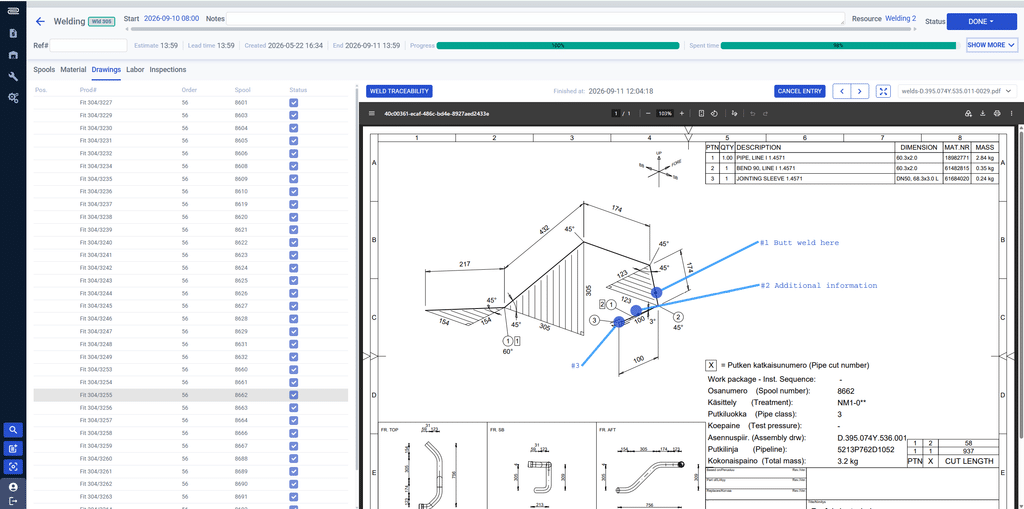
- The shop floor works from it. Fitters and welders open the annotated drawing from the Drawings tab of their bundle, on a workstation, tablet or Android device.
What you can add to a drawing
| Tool | Typical use |
|---|---|
| Text and comments | Fitting instructions, revision notes, questions to the shop floor |
| Lines, shapes and freehand | Highlighting a branch, marking a cut-back, circling a detail |
| Stamps | Approval, QC or “hold” stamps · save your own custom stamps and delete the ones you no longer use |
| Images and signatures | Reference photos, sign-offs |
| Bending data | The spool’s bending table inserted onto the drawing for the bending operator |
| Weld points | Weld numbers placed on the drawing at each weld, linked to the spool’s welds |
Weld numbers where the welds are
Weld annotation connects the drawing to welding traceability. In the spool editor’s weld view, each weld is listed with the two components it joins. You place each weld point on the drawing with a click. Weld numbers can come straight from the PCF file and stay in sync with the annotations, so the number on the drawing is the number in the weld log.
The same drawing on the shop floor
Every bundle has a Drawings tab that shows the spool list on one side and the current drawing on the other. A welder steps through the spools, sees each annotated drawing, records weld traceability and marks the spool done without leaving the view. Nobody has to find the right printout, and an updated annotation reaches the shop floor as soon as it is saved.
Why it matters
A drawing that exists in three versions is a quality risk. When annotations live on paper or in someone’s local PDF tool, there is no guarantee that a late change reaches the person holding the torch. Keeping one annotated drawing per spool, attached to that spool and shown in every work phase, removes the guesswork.
It also saves office time. Weld numbers and bending data that already exist in PipeCloud are put on the drawing by the system, not copied by hand.
Where PipeCloud fits
PDF annotation sits between spool import and production. It builds on the drawings imported with your spools and feeds welding traceability, the shop floor Drawings tab and the bundle printouts.
Ready to see it in action?
See your own spool drawings annotated and opened from a shop floor bundle.