Material Catalogues in PipeCloud
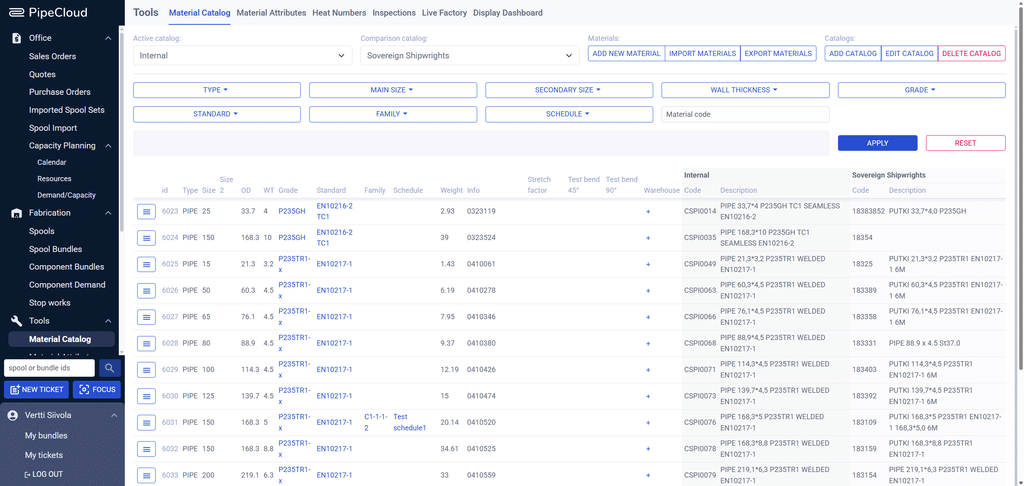
The Challenge: The same 60.3 × 4.5 welded pipe can be called “PUTKI 60,3*4,5 P235TR1 EN10217-1 6M” by one customer, “183389” by another, and “CSPI0063” in your own stock. When those codes are matched by hand, mistakes reach the cutting saw, the picking list and the material certificate. PipeCloud keeps your own catalogue and each customer’s catalogue side by side, so every imported component is matched to the material you actually stock and track.
How it works
- Build your own catalogue. Import materials from a CSV file, add them one by one, or let PCF imports create missing materials automatically, with AI filling in their attributes.
- Add customer catalogues. Keep a separate catalogue for each customer or design source with their own codes and descriptions.
- Compare and map. Open your catalogue next to a customer’s, and see their code and description beside your internal code for each material.
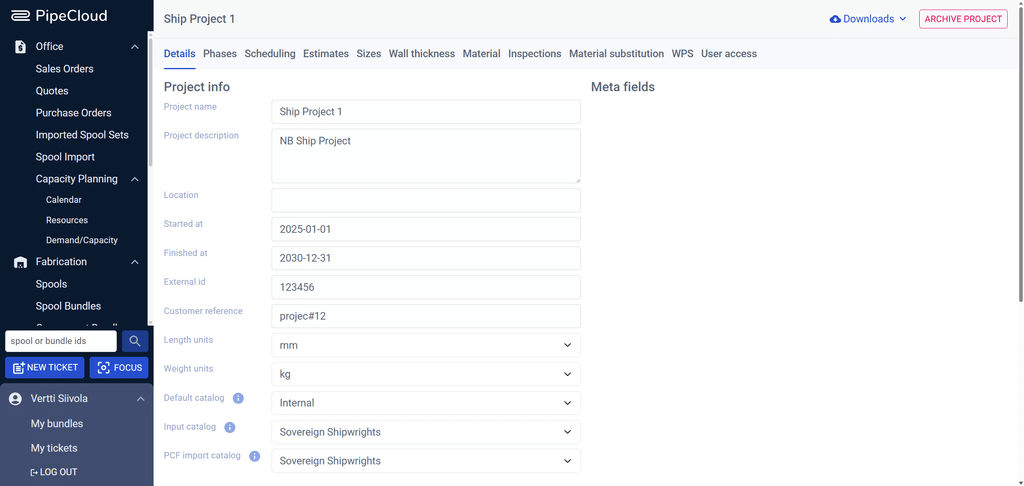
- Import spools against the right catalogue. Each project has a default catalogue, and the spool import uses it to resolve every component. Project material rules can substitute materials during import.
- Use it everywhere. The same material record drives picking lists, cut planning, purchasing exports and heat number traceability.
What a material record holds
| Area | Attributes |
|---|---|
| Identity | Material code · type (pipe, elbow, tee, flange, reducer, olet and 20+ others) · description |
| Dimensions | Main and secondary size (DN) · outer diameter · wall thickness · schedule · weight |
| Specification | Grade · standard · family · additional info |
| Type-specific fields | For example face-to-face length, facing (RF, FF, RTJ) and PN or ASME class for flanges |
| Production data | Test bend values and stretch factor for bending · warehouse locations · linked heat numbers |
Structured, not free text
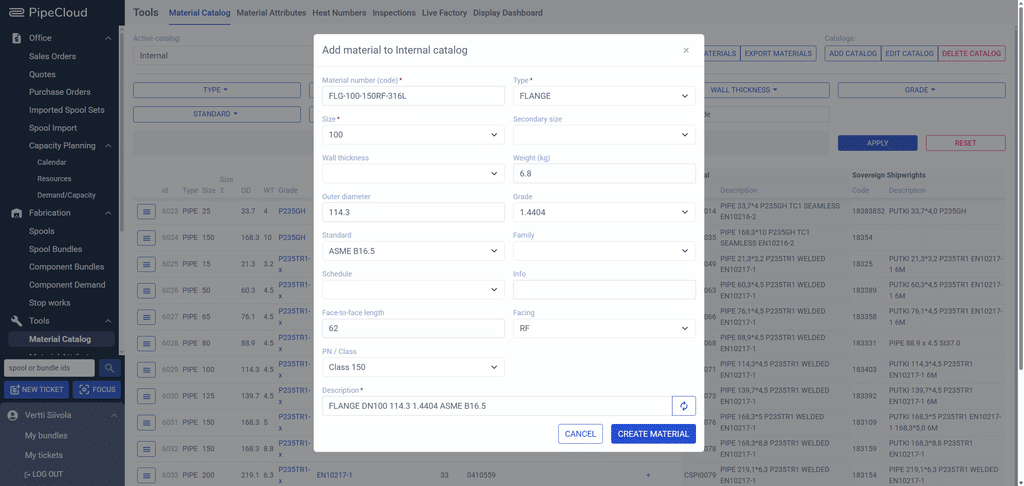
A description such as “FLANGE DN100 114.3 1.4404 ASME B16.5” is built from the material’s attributes, not typed by hand. This keeps descriptions consistent across thousands of items. Fields adapt to the component type: a flange asks for facing and pressure class, a pipe does not. Grades, standards and other attribute values are managed in one list, so “P235TR1” is always spelled the same way.
Finding and fixing materials quickly
- Filters: narrow by type, size, wall thickness, grade, standard, family, schedule or code. Each filter only offers values that still match.
- Filter similar: one click finds every material with the same type, size, wall thickness, grade and standard.
- Show usage: see which spools use a material, open them, or move them to another material.
- Search and replace: replace a material across spools in one operation. Heat number conflicts are flagged for you to resolve.
- AI enrichment: fills in structured attributes (type, sizes, grade, standard and description) from free-text material descriptions. It cleans up existing catalogues and works during PCF imports, so materials found in a PCF file are added to the catalogue with clean, structured data.
The catalogue at work in every spool
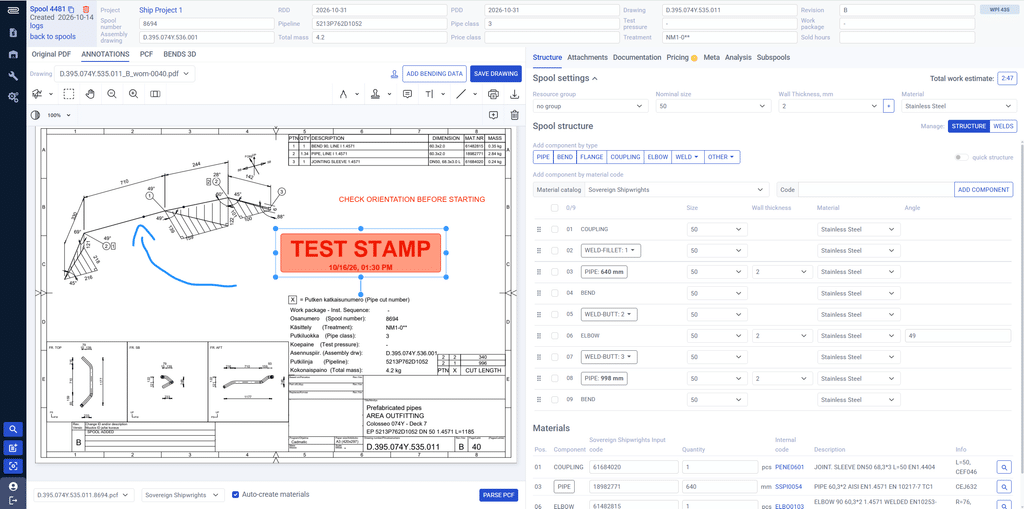
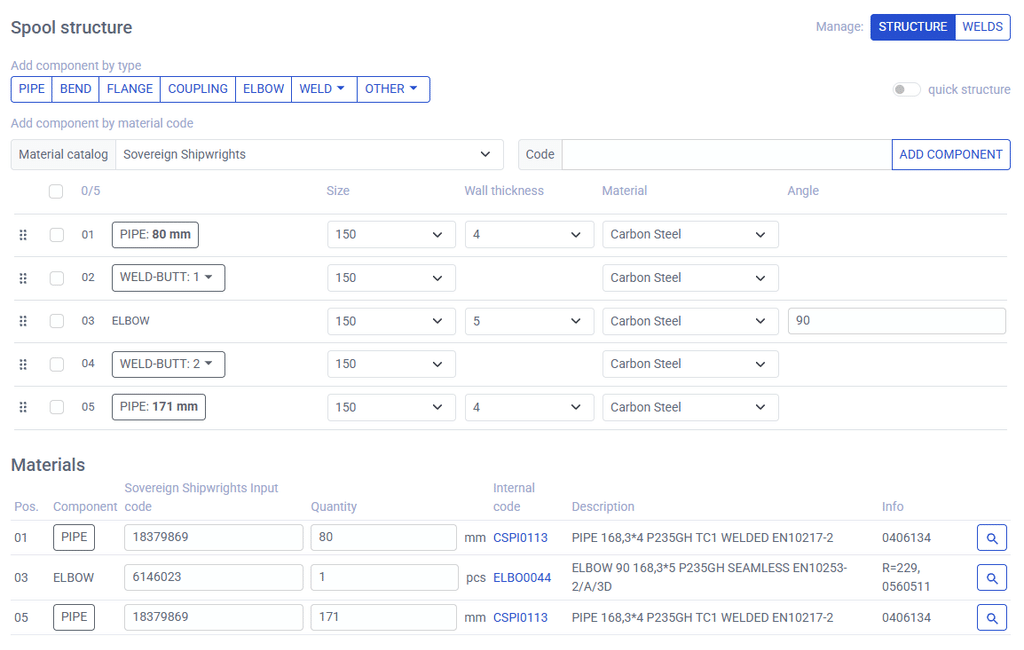
In the spool editor, each component shows the customer’s input code next to your internal code and description. The office sees right away whether the import matched the expected material, and the shop floor gets picking lists in your own codes.
Why it matters
Material errors are expensive because they are found late, at the saw, at the fit-up table or in a traceability audit. A single catalogue with clear mappings removes most of them before production starts. It also makes everything downstream reliable: picking lists, cut nesting, purchase orders and the link between each component and its heat number.
Where PipeCloud fits
Material catalogues sit under projects and spool import. Each project points to its default catalogue, and the catalogue feeds cut nesting, picking, inventory and welding traceability.
Ready to see it in action?
See your own material list imported and mapped to a customer’s codes.