Shop Floor Ticketing in PipeCloud
Report a problem from the spool in hand, route it to the person who can fix it, and keep the whole conversation tied to the work it affects.
The Challenge: A fitter finds a coupling missing from the kit. On most shop floors the next step is a walk to the office, a phone call or a note that gets lost. The foreman hears about it late, purchasing hears about it later, and nobody can say afterwards how many spools were held up or why. PipeCloud turns each of those interruptions into a ticket that is linked to the exact bundle, spool and components, assigned automatically and tracked until it is resolved.
How it works
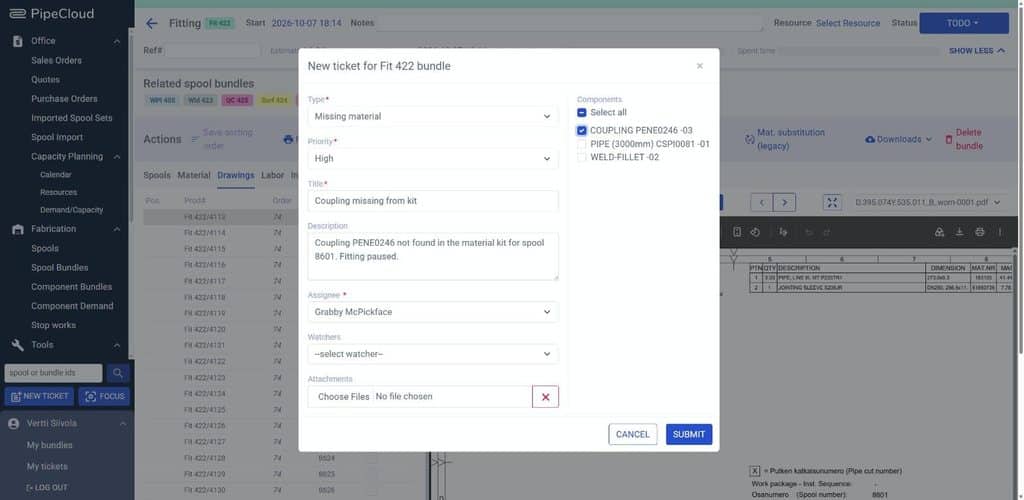
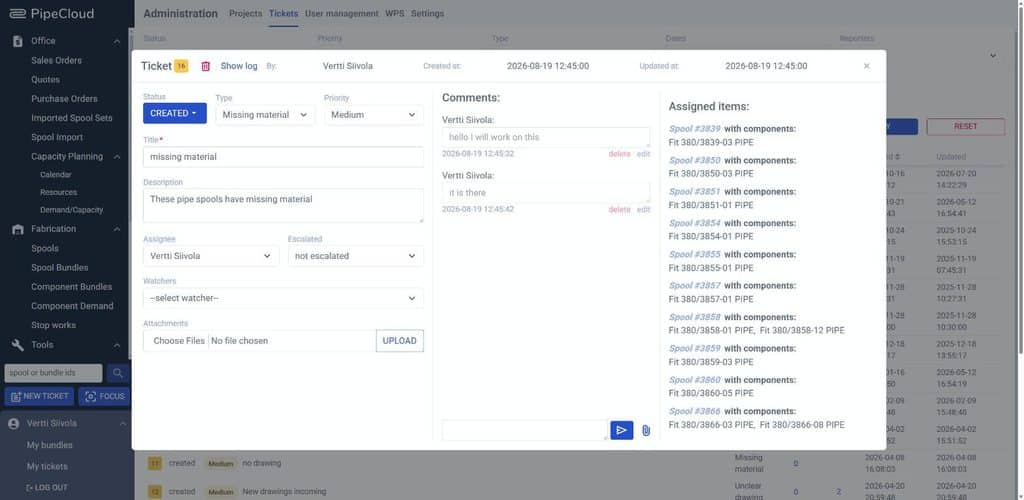
- Raise it where the work is. The New ticket button is available throughout PipeCloud and knows which view you are in. Opened from a bundle, the form is already titled for that bundle and lists the spool’s components to tick.
- It goes to the right person. Each ticket type has a default assignee. A missing-material ticket goes straight to the person who handles material, without anyone forwarding it.
- Everyone follows the same thread. Comments, attachments and watchers stay on the ticket, and assignees and watchers are notified by email. Status moves from Created to Received, Awaiting information, In progress and Resolved.
- Urgent issues get escalated. Priority (Low, Medium, High) and an Escalated field make blocking problems stand out from routine questions.
- Patterns become visible. Managers filter and export every ticket by type, status, priority, reporter, assignee and date to see what keeps stopping production.
What a ticket captures
| Classification | Type (configurable, e.g. missing material, broken machine, unclear drawing) · priority |
| Context | Bundle · spools · individual components |
| Ownership | Reporter · assignee (default per type) · watchers · escalated to |
| Communication | Title · description · comment thread · attachments such as photos |
| Progress | Status: created, received, awaiting information, in progress, resolved, canceled · created and updated timestamps |
Example: material missing from a kit
- Issue reported. A fitter opens Fit 422, sees coupling PENE0246 is missing for spool 8601, and raises a High-priority missing-material ticket with that component ticked.
- Routed automatically. The ticket lands with the material handler set as the default assignee for that type. The foreman is added as a watcher.
- Resolved in the thread. The material handler comments when the part is located. The fitter sees the update on the ticket and continues, and the ticket is closed as resolved.
Every issue, connected to the spool it affects
A ticket in PipeCloud is never just free text. It carries links to the spools and components involved, so the person fixing it can open the drawing, the bundle or the material list in one click. From the ticket list, the spool count opens the spools view already filtered to the affected spools.
One list for the office, one for each user
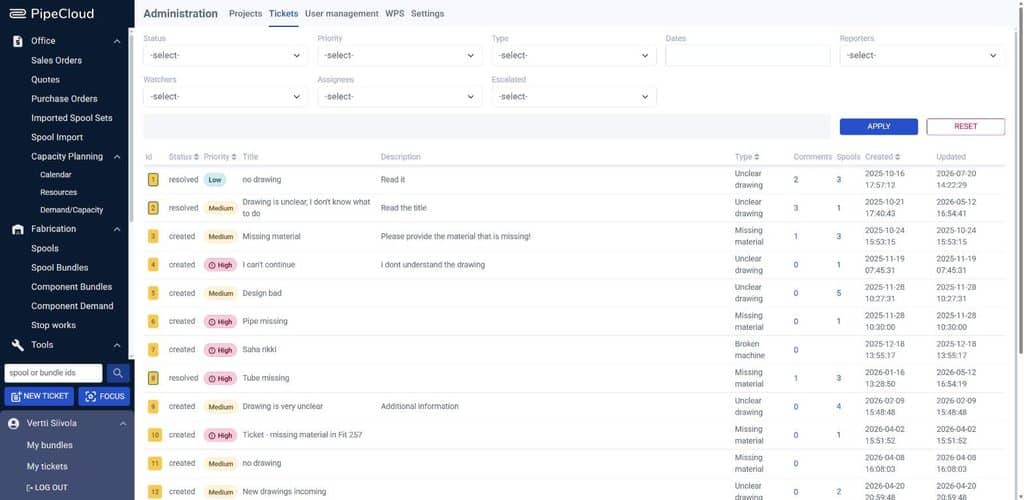
Administrators see every ticket in one list and filter it by status, priority, type, dates, reporter, watcher, assignee and escalation. The list can be exported for weekly reviews. Shop floor users get a My tickets page that shows the issues they reported or follow.
Ticket types are managed by administrators. Each type has a name and a default assignee, so routing matches how your own organisation works.
Why it matters
Small interruptions are where fabrication schedules slip. A missing fitting or an unclear dimension can hold a fitter for an hour, and the same problem often repeats across several spools. When issues are reported verbally, they are also forgotten: nobody can say how many hours were lost to missing material last month, or which drawing revision caused the most questions.
With tickets linked to production data, the shop floor gets faster answers and management gets a record of what actually stops the work.
Where PipeCloud fits
Ticketing is part of PipeCloud’s shop floor workflow, next to bundles, drawings and stop work. A ticket reports a problem and gets it solved. When a spool itself must not move forward, for example after a design revision, stop work holds it across all phases until it is released.
Ready to see it in action?
See how a ticket travels from the shop floor to the right desk and back, using your own spool data.